Search engines use different instructions to discover, crawl, and index web pages. Two important tools that help website owners manage this process are Robots.txt and Meta Robots.
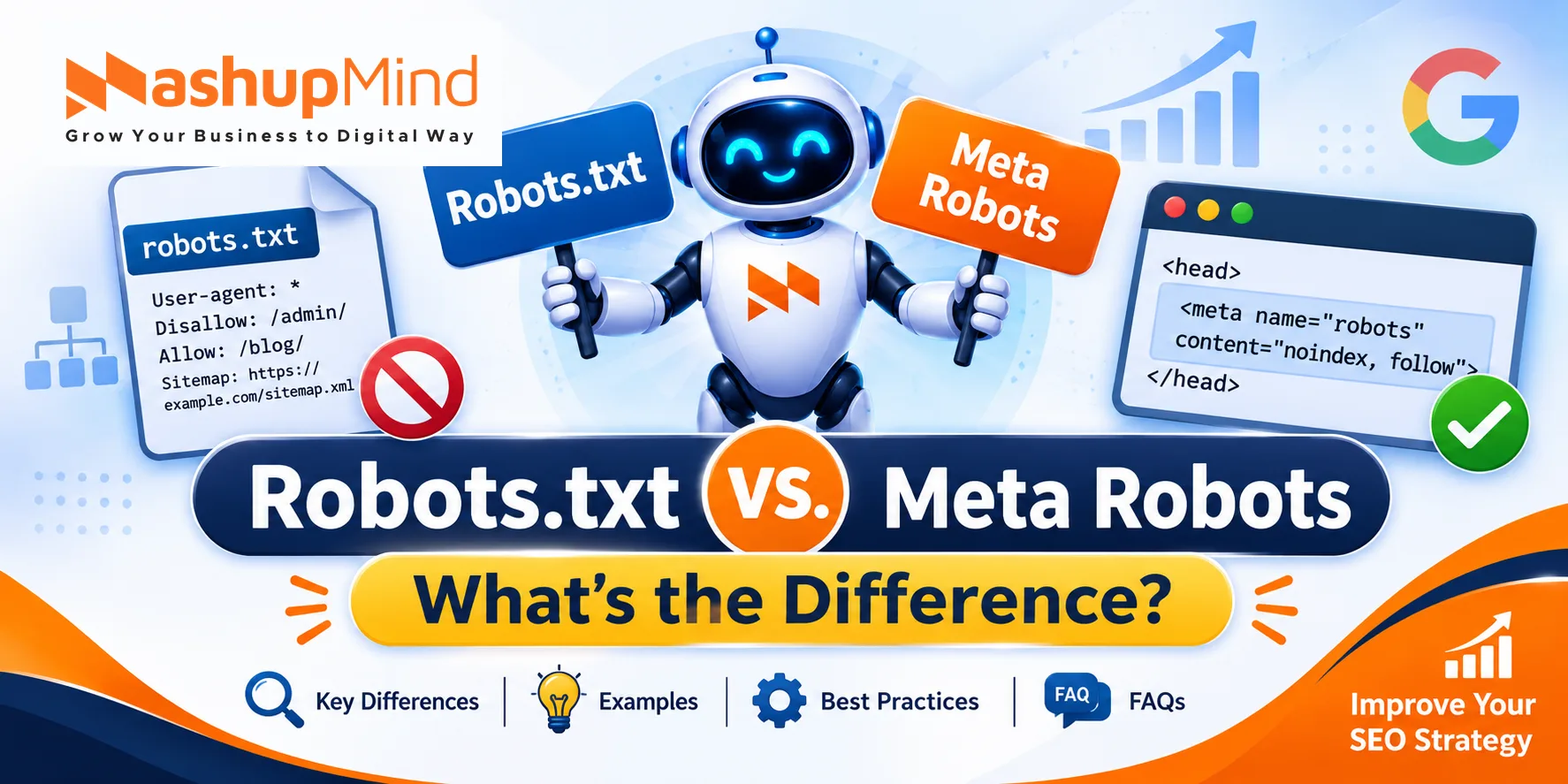
Although both are used to control how search engine crawlers interact with a website, they serve different purposes. Robots.txt primarily controls which URLs crawlers are allowed or requested to crawl, while Meta Robots provides instructions about whether a particular page should be indexed and how its links should be treated.
Understanding the difference between Robots.txt and Meta Robots is essential for technical SEO. Using them incorrectly can lead to indexing problems, unwanted pages appearing in search results, and inefficient crawling.
In this guide, we will explain what Robots.txt and Meta Robots are, how they work, their key differences, implementation methods, practical examples, common mistakes, and SEO best practices.
What Is Robots.txt?
Robots.txt is a text file that website owners use to communicate crawling instructions to search engine crawlers.
It is placed in the root directory of a website and tells compatible crawlers which sections or URLs they should or should not request.
For example, if your website is https://example.com, its Robots.txt file will generally be available at:
https://example.com/robots.txt
The file contains rules that identify specific crawlers and define which parts of a website they can access.
Why Is Robots.txt Important for SEO?
Robots.txt helps website owners manage crawler access and reduce unnecessary crawling of certain website sections.
Its main purposes include:
- Preventing crawlers from accessing selected website sections.
- Reducing unnecessary crawling of duplicate or low-value URL patterns.
- Managing crawler access to certain resources.
- Providing the location of XML sitemaps.
- Helping search engines focus their crawling activity on important URLs.
Important: Robots.txt does not guarantee that a page will stay out of Google search results. A blocked URL can sometimes be indexed if Google discovers it through external links or other signals.
Robots.txt Syntax and Directives
A Robots.txt file uses simple text-based directives to communicate with crawlers.
Here are the most common directives:
| Directive | Purpose |
|---|---|
| User-agent | Specifies which crawler a rule applies to |
| Disallow | Requests that a crawler not access a specified URL or path |
| Allow | Allows crawling of a path, including exceptions to broader rules |
| Sitemap | Specifies the location of an XML sitemap |
| Crawl-delay | Requests a delay between crawler requests; support varies by crawler |
Robots.txt Example
Consider the following Robots.txt file:
User-agent: *
Disallow: /admin/
Disallow: /private/
Allow: /blog/
Sitemap: https://example.com/sitemap.xml
Let’s understand each line:
User-agent: *applies the following rules to all crawlers that support the standard.Disallow: /admin/asks crawlers not to access URLs under the admin directory.Disallow: /private/asks crawlers not to crawl the private directory.Allow: /blog/allows crawling of the blog path, subject to the crawler’s rule processing.Sitemap:identifies the XML sitemap location.
This configuration helps manage crawler access to selected website sections.
What Is a Meta Robots Tag?
A Meta Robots tag is an HTML element placed inside the <head> section of a webpage. It provides instructions to compatible search engine crawlers about how they should handle that specific page.
Unlike Robots.txt, which controls crawler access to URL paths, Meta Robots can communicate indexing and link-following instructions for an individual page.
For example, if you want search engines to crawl a page but not include it in search results, you can use a noindex directive.
Why Is the Meta Robots Tag Important for SEO?
Meta Robots is useful when you want more precise control over how individual pages appear in search engine results.
Common use cases include:
- Preventing thank-you pages from appearing in Google.
- Keeping internal search result pages out of search results.
- Preventing selected landing pages from being indexed.
- Controlling whether links on a page should be followed.
- Managing snippets and cached previews using supported directives.
Common Meta Robots Directives
Here are some important Meta Robots directives:
| Directive | Meaning |
|---|---|
| index | Allows the page to be indexed |
| noindex | Requests that the page not be indexed |
| follow | Allows links on the page to be followed |
| nofollow | Requests that links on the page not be followed |
| noarchive | Requests that a cached copy not be shown |
| nosnippet | Requests that a text snippet or video preview not be shown |
| max-snippet | Sets a maximum length for text snippets |
| max-image-preview | Controls the maximum size of image previews |
| max-video-preview | Sets a maximum duration for video previews |
| notranslate | Requests that Google not offer a translated version |
Some directives are Google-specific or have crawler-specific support. Always check the documentation of the search engine you are targeting.
Meta Robots Example
Suppose you have a thank-you page that should not appear in search results.
You can add this code inside the page’s HTML <head> section:
<head>
  <meta name="robots" content="noindex, follow">
</head>
Here is what the code means:
robotsidentifies the general crawler instruction.noindexrequests that the page not be included in search results.followallows the crawler to follow links on the page.
Another example:
<meta name="robots" content="index, follow">This explicitly requests indexing and link following. These are generally the default behaviors for Google when no conflicting instructions apply.
Robots.txt vs. Meta Robots: Key Differences
Robots.txt and Meta Robots are both useful technical SEO tools, but they work differently.
The biggest difference is that Robots.txt controls crawling, whereas Meta Robots controls indexing-related instructions and other page-level behavior.
| Comparison | Robots.txt | Meta Robots |
|---|---|---|
| Main purpose | Controls crawler access | Provides page-level instructions |
| Location | Root directory of website | HTML head section |
| Scope | URL paths and crawler groups | Individual HTML pages |
| Controls crawling | Yes, for compatible crawlers | No |
| Controls indexing | No reliable indexing prevention | Yes, using noindex |
| Controls link following | No | Yes, using nofollow |
| File format | Plain text | HTML meta element |
| Implementation | Upload or edit robots.txt | Add HTML code to page |
| Common use | Restrict crawling of selected paths | Prevent selected pages from being indexed |
| SEO application | Crawl management | Indexing and snippet management |
Robots.txt vs. Meta Robots: Practical Example
Imagine you manage an eCommerce website with the following URLs:
example.com/products/example.com/cart/example.com/checkout/example.com/blog/
You want search engines to crawl your product and blog pages but do not want checkout and cart pages to appear in search results.
A suitable approach is to allow crawlers to access those pages and use Meta Robots noindex on the cart and checkout pages.
For example:
<meta name="robots" content="noindex, follow">This lets search engines access the page and process the noindex instruction.
If you instead block /cart/ and /checkout/ in Robots.txt, crawlers may not be able to see the Meta Robots tag. As a result, they cannot process the noindex instruction on those pages.
This is one of the most common technical SEO mistakes.
When Should You Use Robots.txt?
Robots.txt is most useful when you want to manage which URLs crawlers can access.
Here are some situations where it can help:
1. Block Admin Sections
Website administration areas generally do not need to be crawled by search engines.
Example:
User-agent: *
Disallow: /wp-admin/
For WordPress, the default robots.txt configuration commonly includes a rule for the admin directory. However, do not block resources such as admin-ajax.php without checking whether they are needed.
2. Manage Internal Search URLs
Internal search pages can create large numbers of URLs with little unique search value.
Example:
User-agent: *
Disallow: /search/
Make sure this rule matches your actual URL structure.
3. Manage Faceted Navigation
eCommerce websites sometimes generate many URL variations through filters, sorting, and tracking parameters.
For example:
https://example.com/shoes/?color=black&size=10
You may use Robots.txt rules for selected URL patterns to manage crawling, but carefully evaluate their impact before blocking them. Important product variations or canonical signals may otherwise become difficult for search engines to discover.
4. Add an XML Sitemap Location
You can specify your sitemap location in Robots.txt:
Sitemap: https://example.com/sitemap.xmlThis helps crawlers discover your sitemap location.
When Should You Use Meta Robots?
Meta Robots is the better choice when you want to provide indexing or link-handling instructions for specific pages.
1. Prevent Thank-You Pages From Being Indexed
After a customer completes a purchase, they may land on a confirmation page.
Such pages generally do not need to appear in search results.
Use:
<meta name="robots" content="noindex, follow">2. Prevent Internal Search Pages From Appearing in Google
Internal search result pages often provide limited standalone value.
Use:
<meta name="robots" content="noindex, follow">3. Control Search Snippets
If you want to limit the text shown in a Google search snippet, you can use:
<meta name="robots" content="max-snippet:150">This requests a maximum text snippet length of 150 characters.
4. Prevent Large Image Previews
You can request a smaller image preview in supported Google search experiences:
<meta name="robots" content="max-image-preview:standard">5. Prevent Links From Being Followed
If you do not want search engines to follow links on a particular page, you can use:
<meta name="robots" content="nofollow">Remember that nofollow is a hint for Google rather than an absolute guarantee that a URL will never be discovered.
Can You Use Robots.txt and Meta Robots Together?
Yes. Both can be used on the same website because they perform different functions.
However, you must avoid conflicting instructions.
For example, if a page needs to be excluded from search results, allow Google to crawl it so that it can discover and process the Meta Robots noindex directive.
Example:
Robots.txt
User-agent: *
Disallow: /private/
Meta Robots
<meta name="robots" content="noindex">In this example, the crawler is blocked from accessing the page. Therefore, it cannot read the Meta Robots instruction.
A better approach, if the objective is to remove the page from search results using noindex, is to remove the Robots.txt restriction and allow crawling.
Need help fixing crawling and indexing issues on your website? MashupMind’s SEO services include a full technical SEO audit — robots.txt rules, noindex directives, sitemaps, and crawl errors fixed. Get a free SEO audit today.
What Is the Difference Between Robots.txt, Meta Robots, and X-Robots-Tag?
Another important technical SEO concept is the X-Robots-Tag.
All three are related to search engine crawler management, but their implementation methods differ.
| Feature | Robots.txt | Meta Robots | X-Robots-Tag |
|---|---|---|---|
| Implementation | Text file | HTML meta tag | HTTP response header |
| Main purpose | Crawl management | Page-level indexing instructions | Indexing instructions |
| Works with HTML pages | Yes, through URL rules | Yes | Yes |
| Works with PDFs | Can manage crawler access | No, not directly | Yes |
| Supports noindex | No | Yes | Yes |
| Supports nofollow | No | Yes | Yes |
What Is X-Robots-Tag?
X-Robots-Tag is an HTTP response header that communicates indexing and other supported search engine instructions.
For example:
X-Robots-Tag: noindexThis tells compatible crawlers not to index the resource.
It is particularly useful for files that do not contain HTML, such as PDFs, images, and other downloadable documents.
How to Check Your Robots.txt File
You can check your website’s Robots.txt file using these steps:
- Open your web browser.
- Enter your website domain followed by
/robots.txt. - Review the available crawling directives.
- Check whether important pages or resources are accidentally blocked.
- Confirm that your sitemap location is correct.
Example:
https://example.com/robots.txt
You can also use Google Search Console’s URL Inspection tool to investigate how Google accesses and processes individual URLs.
How to Check Meta Robots Tags
You can check Meta Robots using several methods.
Method 1: View Page Source
- Open the webpage.
- Right-click anywhere on the page.
- Select View Page Source.
- Search for
robots. - Check whether a Meta Robots tag is present inside the HTML head.
Example:
<meta name="robots" content="noindex, follow">Method 2: Use Browser Developer Tools
- Open the webpage in Chrome.
- Press F12.
- Open the Elements tab.
- Expand the HTML head section.
- Look for the Meta Robots tag.
Method 3: Use SEO Audit Tools
SEO crawling tools can help identify:
- Noindex pages.
- Nofollow directives.
- Robots.txt blocked URLs.
- Pages with conflicting directives.
- Incorrect canonical tags.
- Indexability issues.
Tools such as Screaming Frog SEO Spider, Ahrefs Site Audit, and Semrush Site Audit can help with technical SEO analysis.
Common Robots.txt and Meta Robots Mistakes to Avoid
Incorrect crawler instructions can create serious SEO problems.
Here are some common mistakes website owners and SEO professionals should avoid.
1. Blocking a Page That Uses Noindex
If a page is blocked in Robots.txt, Google may not be able to read its Meta Robots noindex directive.
Solution: Allow crawling when you need Google to process the noindex instruction.
2. Using Noindex in Robots.txt
The following is not a supported Google Robots.txt indexing directive:
User-agent: *
Noindex: /private/
Google does not support the noindex directive in Robots.txt.
Solution: Use a Meta Robots tag or X-Robots-Tag instead.
3. Blocking Important CSS and JavaScript Files
Search engines may need access to CSS and JavaScript resources to understand and render webpages correctly.
Solution: Avoid blocking resources required to render important website content.
4. Applying Noindex to Important Landing Pages
Accidentally adding noindex to product pages, service pages, or important blog posts can remove them from search results.
Solution: Regularly audit your important URLs and check their indexing directives.
5. Forgetting to Remove Development Restrictions
Websites sometimes use Robots.txt restrictions during development and forget to remove them after launch.
Example:
User-agent: *
Disallow: /
This asks all compatible crawlers not to crawl any path on the website.
Solution: Review Robots.txt before launching a website.
6. Using Incorrect URL Patterns
Robots.txt rules use URL matching patterns. A poorly written rule may block more pages than intended or fail to block the intended URLs.
Solution: Test your rules against actual URLs and review crawler behavior.
7. Assuming Robots.txt Provides Website Security
Robots.txt is publicly accessible and does not protect sensitive information.
Solution: Use authentication, authorization, and proper access controls to protect confidential content.
Robots.txt and Meta Robots Best Practices for SEO
To avoid technical SEO issues, follow these recommendations:
- Keep your Robots.txt file simple and properly formatted.
- Place Robots.txt in your website’s root directory.
- Use Meta Robots noindex when you want to prevent a page from being indexed.
- Do not block pages in Robots.txt if Google needs to read their noindex directives.
- Avoid blocking important CSS and JavaScript resources.
- Include your XML sitemap location in Robots.txt.
- Regularly audit important pages for unexpected noindex directives.
- Check your website after redesigns, migrations, and major updates.
- Use X-Robots-Tag for non-HTML resources when necessary.
- Remember that Robots.txt is not a security mechanism.
Final Thoughts
Robots.txt and Meta Robots are both important components of technical SEO, but they solve different problems.
Robots.txt helps manage crawler access to specific website paths, while Meta Robots provides page-level instructions about indexing, link handling, and search appearance.
If your goal is to manage crawling, use Robots.txt. If your goal is to prevent a webpage from appearing in search results, use Meta Robots with the noindex directive. For non-HTML resources such as PDFs, consider using X-Robots-Tag.
Understanding when and how to use these tools can help you avoid indexing issues, improve technical SEO management, and maintain better control over how search engines interact with your website.
Frequently Asked Questions (FAQs)
1. What is the main difference between Robots.txt and Meta Robots?
Robots.txt controls which URLs compatible crawlers are requested to access, whereas Meta Robots provides instructions about how individual pages should be indexed and how their links should be handled.
2. Does Robots.txt prevent Google from indexing a page?
No. Robots.txt prevents compliant crawlers from accessing specified URLs, but it does not guarantee that those URLs will be excluded from search results. Google may index a blocked URL without its content if it discovers the URL through other sources.
3. Does Meta Robots noindex stop Google from crawling a page?
No. The noindex directive does not prevent crawling. Google must be able to access the page to read the directive.
4. Can I use Robots.txt and Meta Robots together?
Yes. They can be used together, but their instructions must not conflict. If you want Google to process a noindex directive, do not block that page in Robots.txt.
5. Which is better for SEO: Robots.txt or Meta Robots?
Neither is universally better. Robots.txt is useful for managing crawling, while Meta Robots is the appropriate option for page-level indexing instructions.
6. Where should I place the Robots.txt file?
Place Robots.txt in your website’s root directory. For example, https://example.com/robots.txt.
7. Where should I add the Meta Robots tag?
Add the Meta Robots tag inside the HTML <head> section of the webpage.
8. What does noindex, follow mean?
Noindex, follow requests that a search engine does not include the page in its search results but may follow links on that page.
9. Can Robots.txt block Googlebot?
Yes. You can use a User-agent directive to specify Googlebot and a Disallow directive to restrict its access to selected URL paths.
Example:
User-agent: Googlebot
Disallow: /private/
10. What is X-Robots-Tag in SEO?
X-Robots-Tag is an HTTP response header that provides indexing and other supported instructions to search engine crawlers. It is useful for HTML and non-HTML resources such as PDFs.
11. Does Google support noindex in Robots.txt?
No. Google does not support noindex as a Robots.txt directive. Use a Meta Robots tag or X-Robots-Tag instead.
12. How can I check whether a page is noindex?
You can view the page source, inspect the HTML head section, check the HTTP response headers, or use an SEO crawling tool to identify noindex directives.
13. Can a page be indexed if it is blocked by Robots.txt?
Yes. A blocked URL can sometimes appear in search results without a description if Google discovers it through external links or other information.
14. Is Robots.txt required for every website?
No. A website can function without a Robots.txt file. However, having a properly configured file can help communicate crawling preferences to compatible crawlers.
15. Can I use nofollow and noindex together?
Yes. You can use:
<meta name="robots" content="noindex, nofollow">This requests that the page not be indexed and that its links not be followed by compatible crawlers.
Fix Your Technical SEO with MashupMind
Robots.txt and Meta Robots are small files with big consequences — one wrong rule can hide your best pages from Google. If you want an expert to audit your crawling and indexing setup, contact MashupMind for a free SEO audit. We are an Ahmedabad-based digital marketing agency helping businesses grow their online presence, improve Google rankings, generate quality leads, and achieve sustainable digital growth through result-driven SEO and digital marketing strategies.

I’m Kishan Rana, an SEO professional and digital marketing specialist with over 8 years of hands-on experience in search engine optimization, organic growth strategies, and online visibility enhancement. I’m passionate about analyzing search algorithms, exploring ranking strategies, and helping businesses build sustainable traffic through data-driven SEO practices. Through Mashupmind, I share practical insights, industry trends, and actionable techniques designed to help brands grow smarter in the digital landscape.